SoundUP Logo

SoundUP

Software
audio upscale

Cross-platform tool for audio processing

More Details
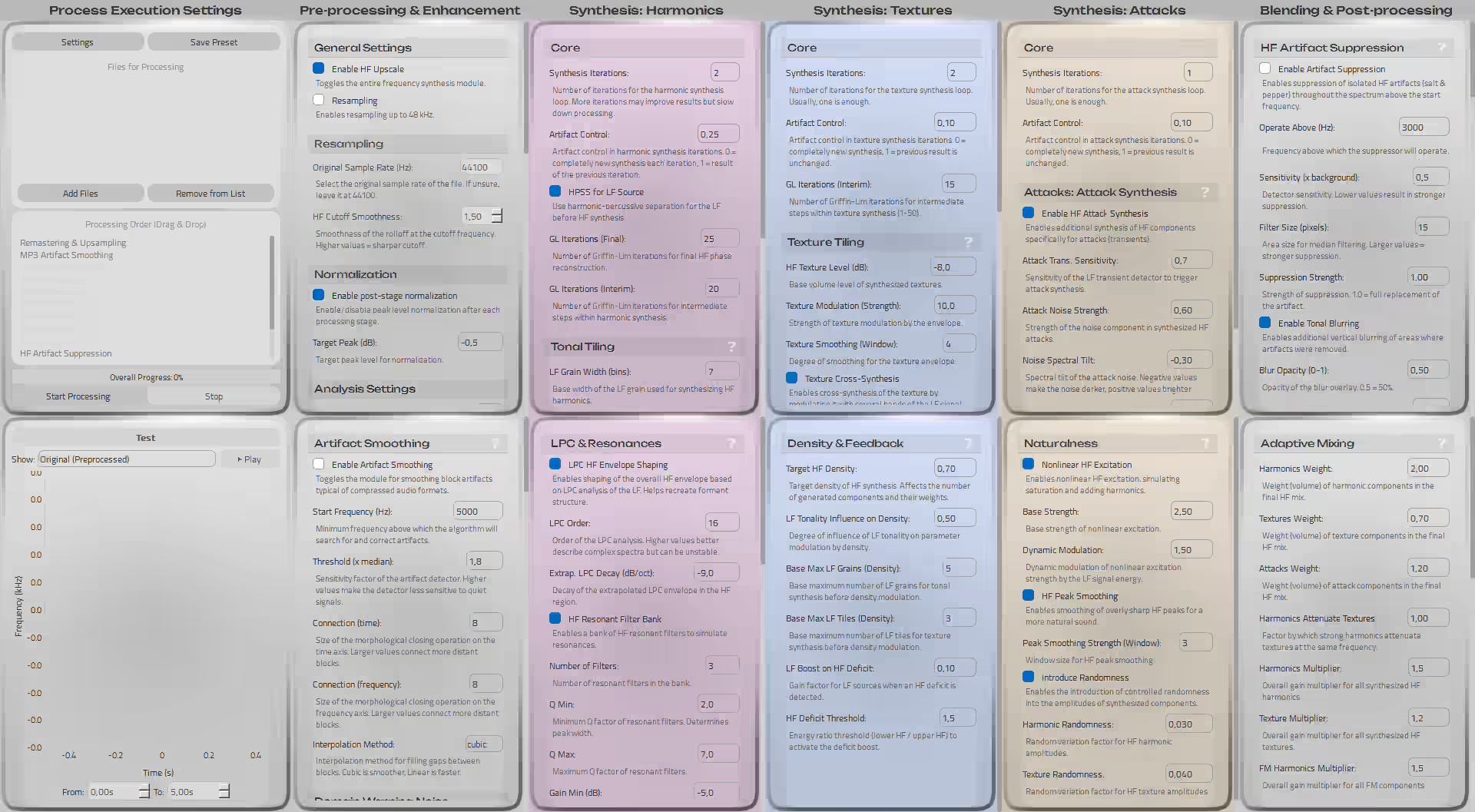
Product Interface

Pre-processing & Enhancement

Synthesis: Harmonics

Synthesis: Textures

Synthesis: Attacks

Mixing & Post-processing

Remastering & Upsampling

Declipping

Transient Enhancement (ATR)

Stereo Correction (ASC)

A True Enhancer

In desperate attempts to find an 'audio enhancer' tool, you must have often come across various services offering AI enhancement that are in fact either equalizers or noise suppressors. Quite an enhancement, isn't it? It makes your ears curl. SoundUP offers the user not a simple equalizer, but a real sound synthesis.

See for Yourself

Press Play and switch between versions in real time.

Rock

Original SoundUP
0:00 / 0:00

Artist & Title: Europe - The Final Countdown

Original Track Sample Rate: 16 kHz, .wav

Sample Rate After Synthesis: 48 kHz, .wav

Spectrogram Density Before Synthesis: 14%

Spectrogram Density After Synthesis: 88%

Jazz

Original SoundUP
0:00 / 0:00

Artist & Title: Django Reinhardt - Minor Swing

Original Track Sample Rate: 44.1 kHz, .wav

Sample Rate After Synthesis: 48 kHz, .wav

Spectrogram Density Before Synthesis: 65%

Spectrogram Density After Synthesis: 92%

Electronic Music

Original SoundUP
0:00 / 0:00

Artist & Title: Petri Alanko - A Whisper

Original Track Sample Rate: 8 kHz, .wav

Sample Rate After Synthesis: 48 kHz, .wav

Spectrogram Density Before Synthesis: 8%

Spectrogram Density After Synthesis: 85%

Popular Music

Original SoundUP
0:00 / 0:00

Artist & Title: Mister Credo - Медляк

Original Track Sample Rate: 8 kHz, .wav

Sample Rate After Synthesis: 22 kHz, .wav

Spectrogram Density Before Synthesis: 14%

Spectrogram Density After Synthesis: 55%

Classical Music

Original SoundUP
0:00 / 0:00

Artist & Title: Placeholder Artist - Classical Piece

Original Track Sample Rate: 32 kHz, .wav

Sample Rate After Synthesis: 48 kHz, .wav

Spectrogram Density Before Synthesis: 55%

Spectrogram Density After Synthesis: 90%

Voice / A Cappella

Original SoundUP
0:00 / 0:00

Source: Запись голоса

Original Track Sample Rate: 22.05 kHz, .wav

Sample Rate After Synthesis: 48 kHz, .wav

Spectrogram Density Before Synthesis: 30%

Spectrogram Density After Synthesis: 89%

And All of This — Without AI!

Magic?

No, just pure math.

Try It Now

Choose Your Version

Try the free Community Edition with core functionality. Valid for eternity.
Download Community Edition

Or purchase the Professional Edition with all features available for $15.00.

After successful payment, the product will be available for download in your personal account.

Frequently Asked Questions

General Questions

How does SoundUP differ from 'AI enhancers'?
SoundUP does not improve the sound of an existing low-quality track with simple equalizers and noise suppressors. Frankly speaking, this is exactly what the vast majority of online services do. Instead, SoundUP performs sound synthesis. In a way, it is Spectral Band Replication (SBR), but better.
What genres of music is the program suitable for?
Absolutely any. The algorithms analyze the harmonic and textural structure of any audio, be it classical music, an electronic track, a podcast, or an old rock recording. Deep settings allow adapting the synthesis to specific material.
Does the program load the processor heavily?
Audio processing is a resource-intensive task. However, the program is optimized with compilation into machine code and supports multi-threaded processing to use the power of modern processors as efficiently as possible. The number of CPU cores used can be changed in settings if the system begins to lag during processing.

Synthesis & HF Upscale

What is the difference between Harmonics, Textures, and Attacks?
These are the three pillars of our synthesis. Harmonics are the tonal, musical part of the sound. Textures are the "airy," noise component (hiss, ambiance). Attacks are sharp, percussive bursts. Separate adjustment allows you to precisely recreate the character of the original sound in the HF range.
My upscale sounds too harsh. How to fix it?
Try reducing "Attack weight" and "Harmonics weight" in the "Mixing" module. You can also increase "HF peak smoothing" in the "Naturalness" module or decrease "Max gain" in the "Sibilant Booster" if the problem is in sibilant sounds.
What does "deterministic" upscale mean?
This means that with the same settings and the same source file, the result will always be 100% identical. Unlike AI, there is no element of randomness here. You fully control the process, and it is absolutely predictable.
Why is HPSS (harmonic-percussive source separation) used?
HPSS allows us to analyze the tonal and percussive parts of the LF signal separately. This is the key to high-quality synthesis: tonal "grains" are used to create HF harmonics, and percussive "tiles" — to create HF textures and attacks.

Pre-processing & Restoration

When should I use "MP3 Smoothing"?
This module is ideal for audio files compressed with a low bitrate (e.g., old MP3s at 128kbps). It finds and "heals" characteristic blocky artifacts in the HF range, preparing a clean spectrum for further upscaling.
What is the difference between "General" and "Vocal" resonators?
The "General resonator" works across the entire spectrum, enriching any instruments with harmonics. The "Vocal resonator" is specifically tuned to the frequency bands and harmonic series characteristic of the human voice to add "body" and warmth to it.
Will "Declipping" fix a heavily overloaded track?
It can significantly improve the situation by reconstructing the shape of "clipped" peaks and returning some of the dynamics. However, with very severe and prolonged distortions, full recovery is impossible. It works best with short, impulsive overloads.
What is "Remastering" and when is it needed?
This module is used to increase the original sample rate (e.g., from 22050 Hz to 48000 Hz). It does not just pad with zeros but intelligently reconstructs missing samples. Use it if you are working with files in old formats or if auto-scanning showed a low original sample rate.

Post-processing & Mixing

What does "Spectral Deconstruction" do?
This is a powerful tool for final polishing. It "deconstructs" the already synthesized HF signal back into tonal, noise, and transient parts, allowing you to change their balance. For example, you can make "air" (noise) quieter without affecting the clarity of cymbals (transients).
The stereo image became strange. What should I adjust?
Pay attention to the "Stereo Correction (ASC)" module. Try reducing "Width strength" if the sound becomes too wide, or adjust the "Number of bands." Sometimes stereo problems can occur due to strong processing of the Side channel, check your synthesis settings.
What is ATR (Transient Enhancement)?
ATR (Advanced Transient Reconstructor) is a module that makes the attacks of sounds clearer and more punchy. It finds percussive moments in the track and slightly boosts their initial phase without increasing overall volume. Excellent for drums and percussion.
How do "Weights" work in the "Mixing" module?
These are your main regulators of the final timbre. They determine which of the three synthesized components (Harmonics, Textures, Attacks) will dominate the final HF signal. Increasing the weight of harmonics gives you a cleaner and more musical sound. Increasing the weight of textures gives a more "airy" and whispering sound.

Licensing & Usage

What are the limitations of the free version?
The free version (CE) provides core functionality: resampling and HF upscale with universal, pre-configured parameters. It has all modules of fine-tuning, pre-processing, post-processing, and batch file processing disabled.
Is the license for SoundUP Pro lifetime?
Yes. By purchasing SoundUP Pro, you get a perpetual license for the current major version (e.g., all updates within version 1.x.x). Major updates (e.g., to version 2.0.0) may require a paid upgrade with a significant discount for existing users.
Can I install the program on multiple computers?
The standard Pro license is intended for a single user and can be used on up to two computers (e.g., a home PC and a laptop), but not for simultaneous use.